Stage 01 · Write · Researched comparison
Best Android Animation Libraries in 2026
Lottie for Android (airbnb/lottie-android) is the first pick for teams that want to play designer-made After Effects animations from JSON in a View or Compose app. If you build UI in Compose, the built-in Jetpack Compose animation APIs cover most needs without an extra dependency. For interactive, state-driven motion designed in a dedicated editor, Rive's Android runtime is the alternative to evaluate.

By Shihab Mia
Published 28 Nov 2026 · 6 tools compared
We run no ads and no affiliate links at launch. The order of a list follows our published method. See how we score.
Prices are the starting prices vendors list publicly. Plans change, so confirm the current price on the vendor page before you buy.
Key takeaways
- Lottie, Jetpack Compose animation, MotionLayout, Rive, DynamicAnimation and Compottie are all free to use; most are open source, and the AndroidX and Compose APIs ship with the platform libraries.
- Lottie and Compottie play JSON animations exported from After Effects; Rive plays its own .riv format built in the Rive editor.
- MotionLayout and the Compose animation APIs are best for layout transitions and state changes written in code, not for asset-based motion graphics.
- All six run on Android; Compottie targets Compose Multiplatform, and Rive offers runtimes for several platforms beyond Android.
Who each pick is for
- Playing After Effects JSON animations in Android appsLottie for Android
- Teams building UI in Jetpack ComposeJetpack Compose animation APIs
- View-based layout transitions and coordinated motionMotionLayout
- Interactive, state-driven animations built in the Rive editorRive Android runtime
- Physics-based spring and fling animationsDynamicAnimation
- Lottie playback in Compose Multiplatform projectsCompottie
Comparison
| Tool | Best for | Standout feature | Listed starting price | Free plan or trial |
|---|---|---|---|---|
| 1Lottie for Android | Playing After Effects JSON animations in Android apps | Mature, widely used library | Free (open source) | Free plan |
| 2Jetpack Compose animation APIs | Teams building UI in Jetpack Compose | Built into Compose, no extra dependency | Free | Free plan |
| 3MotionLayout | View-based layout transitions and coordinated motion | Declarative XML motion scenes | Free | Free plan |
| 4Rive Android runtime | Interactive, state-driven animations built in the Rive editor | Runtime is open source | Free (open source) | Free plan |
| 5DynamicAnimation | Physics-based spring and fling animations | Part of AndroidX, no extra dependency | Free | Free plan |
| 6Compottie | Lottie playback in Compose Multiplatform projects | Brings Lottie JSON playback to Compose Multiplatform | Free (open source) | Free plan |
How we picked
We picked libraries that genuinely handle animation on Android and are currently maintained. Criteria were fit for the job, supported platforms, license and price, and the main practical limits such as authoring workflow and performance on low-end devices. Sources are vendor documentation, Android developer guides and project repositories. Prices and plan limits change, so confirm details on the vendor site before you commit.
The tools, one by one
Lottie for Android
Best for playing After Effects JSON animations in Android apps
What it is and where it fits
Lottie for Android is Airbnb's runtime for Bodymovin JSON exported from Adobe After Effects. It renders vector animations without re-exporting video or image sequences, so files stay small and scale cleanly. The library works with the classic View system and with Jetpack Compose, and it exposes controls for speed, progress, looping and playback listeners.
It is open source under the Apache 2.0 license and free to use. The main requirement is a design workflow: someone has to build and export the animation. Large, layered files can be heavy on low-end devices, so test on real hardware. Skip it if your motion is simple UI state changes that Compose can already animate.
Standout: Mature, widely used library
Free (open source), as listed by the vendor (Lottie for Android website). Confirm the current plan price before you buy.
Free plan. Plans change, so confirm on the vendor's pricing page before you buy.
Benefits
- Mature, widely used library
- supports both View and Compose
- rich set of animation controls
Drawbacks
- Needs a designer to produce JSON
- complex files can cost render performance
Skip it if this limit matters to you: needs a designer to produce JSON.
Verdict. A sensible pick for playing After Effects JSON animations in Android apps.
Alternatives in this guide: Jetpack Compose animation APIs, MotionLayout, Rive Android runtime
Jetpack Compose animation APIs
Best for teams building UI in Jetpack Compose
What it is and where it fits
The Compose animation APIs are part of the AndroidX Compose libraries. They cover animated values, visibility and content transitions, crossfades, and gesture-driven motion through helpers like animate*AsState, AnimatedVisibility, AnimatedContent and updateTransition. Because they are part of Compose, they compose naturally with state and recomposition.
They are free and ship with the platform libraries, so there is no separate license or vendor. The limit is scope: they animate what you write in Kotlin, and they do not play exported animation files. They also apply only to Compose UI. If your app is still View-based, or you need designer-authored motion graphics, pair Compose with Lottie or use MotionLayout instead.
Standout: Built into Compose, no extra dependency
Free, as listed by the vendor (Jetpack Compose animation APIs website). Confirm the current plan price before you buy.
Free plan. Plans change, so confirm on the vendor's pricing page before you buy.
Benefits
- Built into Compose, no extra dependency
- covers state, visibility, content and gesture-driven animation
Drawbacks
- Compose only, not for View-based screens
- code-driven, so designers cannot author motion alone
Skip it if this limit matters to you: compose only, not for View-based screens.
Verdict. A sensible pick for teams building UI in Jetpack Compose.
Alternatives in this guide: Lottie for Android, MotionLayout, Rive Android runtime
MotionLayout
Best for view-based layout transitions and coordinated motion
What it is and where it fits
MotionLayout is part of AndroidX ConstraintLayout and extends it with declarative motion. You describe start and end states in an XML motion scene, and MotionLayout interpolates between them, including keyframes, path motion and coordinated changes across multiple views. It is well suited to onboarding screens, expanding headers and transitions between layout states.
It is free and ships as part of the AndroidX ConstraintLayout library. The trade-off is complexity: motion scenes take time to learn, and debugging them can be harder than writing Compose animations. It targets the View system, so Compose-first teams will usually prefer the Compose animation APIs. Use it when you have View layouts that need rich, coordinated transitions.
Standout: Declarative XML motion scenes
Free, as listed by the vendor (MotionLayout website). Confirm the current plan price before you buy.
Free plan. Plans change, so confirm on the vendor's pricing page before you buy.
Benefits
- Declarative XML motion scenes
- handles complex constraint-based transitions
Drawbacks
- Steep learning curve
- tied to the View system and ConstraintLayout
Skip it if this limit matters to you: steep learning curve.
Verdict. A sensible pick for view-based layout transitions and coordinated motion.
Alternatives in this guide: Lottie for Android, Jetpack Compose animation APIs, Rive Android runtime
Rive Android runtime
Best for interactive, state-driven animations built in the Rive editor
What it is and where it fits
The Rive Android runtime plays .riv files created in the Rive editor. Unlike a simple playback format, Rive files can include state machines, so animations react to input and app state at runtime. The runtime integrates with both View and Compose and supports data binding to drive properties from code.
The Android runtime is open source and free to use. The Rive editor has its own plans, so check the vendor pricing page for authoring costs and limits. The main constraint is workflow: your team needs to learn the Rive editor, and the ecosystem of ready-made assets is smaller than Lottie's. Choose it when you need interactive motion rather than linear playback.
Standout: Runtime is open source
Free (open source), as listed by the vendor (Rive Android runtime website). Confirm the current plan price before you buy.
Free plan. Plans change, so confirm on the vendor's pricing page before you buy.
Benefits
- Runtime is open source
- supports interactive state machines and data binding
Drawbacks
- Requires the Rive editor to author assets
- smaller ecosystem than Lottie
Skip it if this limit matters to you: requires the Rive editor to author assets.
Verdict. A sensible pick for interactive, state-driven animations built in the Rive editor.
Alternatives in this guide: Lottie for Android, Jetpack Compose animation APIs, MotionLayout
DynamicAnimation
Best for physics-based spring and fling animations
What it is and where it fits
DynamicAnimation is the AndroidX physics-based animation library. It provides spring animations and fling animations driven by physical properties such as stiffness and damping, so motion feels natural without hand-tuned keyframes. It is commonly used for drag-to-dismiss, scroll fling and springy UI responses.
It is free and ships as part of AndroidX. The scope is deliberately narrow: it handles physics, not asset playback or layout transitions, so it is usually combined with other tools. The API is built around View properties. Compose has its own spring and fling APIs, so Compose teams may not need it. Use it for tactile, physics-driven feedback in View-based screens.
Standout: Part of AndroidX, no extra dependency
Free, as listed by the vendor (DynamicAnimation website). Confirm the current plan price before you buy.
Free plan. Plans change, so confirm on the vendor's pricing page before you buy.
Benefits
- Part of AndroidX, no extra dependency
- natural spring and fling behavior with little code
Drawbacks
- Narrow scope, physics only
- View-oriented API
Skip it if this limit matters to you: narrow scope, physics only.
Verdict. A sensible pick for physics-based spring and fling animations.
Alternatives in this guide: Lottie for Android, Jetpack Compose animation APIs, MotionLayout
Compottie
Best for lottie playback in Compose Multiplatform projects
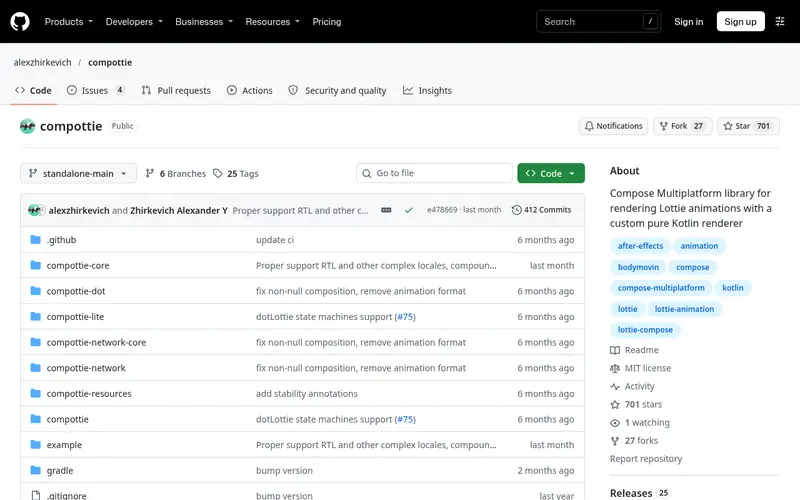
What it is and where it fits
Compottie is an open-source library that plays Lottie JSON animations in Compose Multiplatform. It targets teams that share Compose UI across Android, iOS, desktop and web and want the same animation assets on each platform. It supports the common Lottie feature set and integrates with Compose state.
It is free and open source. The trade-off is maturity: it is a smaller project than Lottie for Android, with fewer integrations and less documentation, so expect to read the source when you hit edge cases. If your app is Android-only, Lottie for Android is the safer default. Choose Compottie when multiplatform sharing is the priority.
Standout: Brings Lottie JSON playback to Compose Multiplatform
Free (open source), as listed by the vendor (Compottie website). Confirm the current plan price before you buy.
Free plan. Plans change, so confirm on the vendor's pricing page before you buy.
Benefits
- Brings Lottie JSON playback to Compose Multiplatform
- open source
Drawbacks
- Smaller project than Lottie for Android
- fewer integrations and less documentation
Skip it if this limit matters to you: smaller project than Lottie for Android.
Verdict. A sensible pick for lottie playback in Compose Multiplatform projects.
Alternatives in this guide: Lottie for Android, Jetpack Compose animation APIs, MotionLayout
Who should use what
Teams with a designer producing After Effects motion should start with Lottie for Android. Compose-first teams animating UI state should use the built-in Compose animation APIs, adding Lottie only for exported assets. View-based apps that need coordinated layout transitions should look at MotionLayout, with DynamicAnimation for spring and fling feedback. Teams that want interactive, state-machine-driven motion should evaluate Rive, and multiplatform Compose projects should consider Compottie.
Questions to settle before you buy
What to check before you buy
- Confirm the library supports your UI stack: View, Compose, or Compose Multiplatform.
- Check the license and whether the runtime and the authoring tool are priced separately.
- Test animation files on low-end devices for frame drops and memory use.
- Verify the authoring workflow: who builds the animation, and in which tool.
- Check maintenance activity on the repository before adopting a smaller project.
FAQ
Are these Android animation libraries free?
Most are. Lottie for Android, Rive's Android runtime and Compottie are open source. The Compose animation APIs, MotionLayout and DynamicAnimation ship as part of AndroidX and the platform libraries. Rive's editor has separate plans, so check the vendor pricing page for authoring costs.
What is the difference between Lottie and Rive?
Lottie plays JSON animations exported from After Effects. Rive plays .riv files built in the Rive editor, and those files can include interactive state machines that respond to input. Lottie suits linear motion graphics; Rive suits interactive, state-driven animation.
Can I use Lottie with Jetpack Compose?
Yes. Lottie for Android supports Compose through its Compose integration. For Compose Multiplatform projects that share UI across platforms, Compottie is an alternative that plays Lottie JSON in shared Compose code.
Do I need a designer to use these libraries?
Not for the Compose animation APIs, MotionLayout or DynamicAnimation, which you write in code. Lottie, Rive and Compottie play authored assets, so someone needs to create the animation files in After Effects or the Rive editor.
Which library is best for simple UI animations?
The Jetpack Compose animation APIs cover most UI state, visibility and content transitions with no extra dependency. For View-based screens, MotionLayout handles layout transitions and DynamicAnimation handles spring and fling motion.
Sources we checked
Method: how we score · editorial policy.
Change log. First published 28 Nov 2026.